
Manual Log-in
If creating ads manually and not through an automated launch of Jivox, follow these steps:
- Enter the appropriate Jivox team login credentials using this login page: http://advslate.jivox.com/studio/loginPortal.php
- In the Admin Panel, search for existing account by Advertiser or Email
- From the Actions menu, click the down arrow and click Sign Into Advertiser Account

Creating a New Advertiser Account
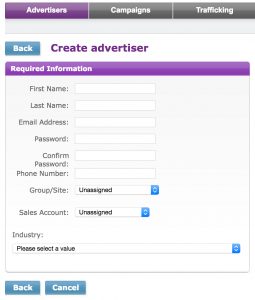
- Click Create Advertiser button
- Enter the following required info pieces:
- First Name: Full Company Name as given in SF
- Last Name: SFDC ID (must always have this)
- Email Address: first & last word of company name@SFDC ID.com (ie: hobbylobby@0017000000tw2uxAAA.com)
- Password: Neuron2017
- Company Name: Full Company Name
- Save
**Important: leave the Group/Site & Sales Account fields at their default position**